
How to Integrate a Payment Gateway in Adobe Commerce (Magento) With Paycaps






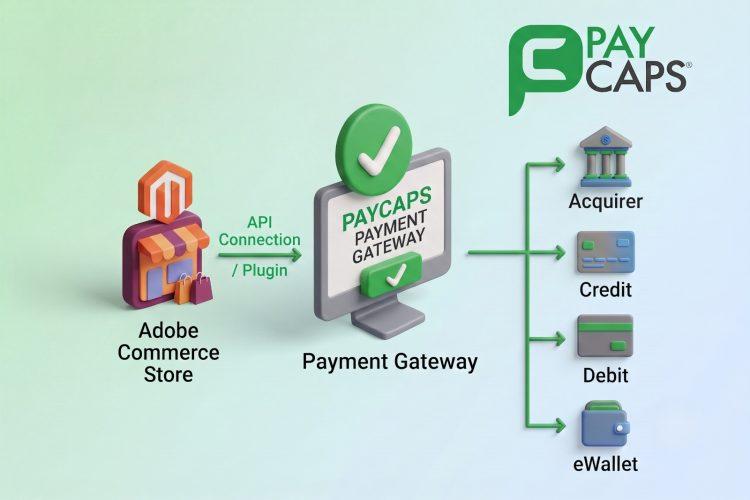
How to Integrate a Payment Gateway in Adobe Commerce (Magento) With Paycaps
A convenient checkout experience is vital for all e-commerce stores, and the selection of the right payment gateway for your Magento based store can help you get one. Customers want convenient, safe, and fast methods to pay for their purchases, whereas merchants require a solution that will make the payment process easy and help the business develop further. In case you were wondering about how to integrate a payment gateway in Magento, there are several ways to do that. A smooth Magento payment gateway integration ensures secure transactions, supports multiple payment methods, and creates a seamless checkout experience for your customers.
This guide will take you through the process of integrating Paycaps payment gateway into Magento, everything you’ll need for its integration, as well as testing it. Whether you’re about to launch or trying to simplify payment processing across several storefronts, here’s your map.
What Is Adobe Commerce (Magento)?
Adobe Commerce, formerly called Magento, is a reputable eCommerce solution that can help businesses worldwide.When paired with a secure Magento payment gateway like Paycaps, merchants can deliver a faster, safer, and more reliable checkout experience. It provides all the features necessary for successful selling online, including product and stock management, as well as account and order management for customers. The high flexibility of the platform is one of its greatest strengths because it makes it equally applicable for small companies and large enterprises. Nonetheless, a good online store should have not only a variety of selling options but also a safe means of accepting payments. In this regard, an effective Magento payment gateway like Paycaps comes into play
Creating a Merchant Account
Before integrating Paycaps into Magento, a merchant needs to have an active merchant account that will allow him to make payments to customers, settle payments, and perform transactions via the PayCaps Merchant Dashboard.
Some payment processors bundle the gateway and merchant account together. Others, like Paycaps offer more control and automation.
Here’s how it works:
- The gateway collects payment information at checkout.
- Once authorized, the gateway redirects the processed payment to your merchant account.
- Funds are then settled into your business bank account.
Setting Up a Magento Payment Gateway With Paycaps
PayCaps offers a solution for providing your customers with a quick, safe, and hassle-free checkout procedure by making it simple to integrate a secure payment gateway to Adobe Commerce (Magento). The PayCaps Magento payment gateway plugin will enable you to quickly and simply complete your magento payment gateway integration without having to go through a laborious development procedure. You may make online payments with confidence thanks to its support for many payment methods, multiple currencies, and other security features. PayCaps is unquestionably the best option for you if you have already created a Magento store or intend to do so.
Here is a step by step guide to set up a payment gateway with paycaps
Step 1: Sign Up for a PayCaps Merchant Account
Join the PayCaps merchant account and get business verification done. You will be provided with the PayCaps Merchant Dashboard, where you will be able to manage the Magento payment gateway integration settings.
Step 2: Generate Your API Credentials
From the PayCaps Merchant Dashboard, collect:
- Merchant ID
- API Key
- Secret Key
- Sandbox credentials
- Live credentials
These credentials are required to connect Magento with Paycaps
Step 3: Install the PayCaps Magento Extension
Download the official PayCaps Magento extension provided by the PayCaps team (or through your account manager) and install it in your Adobe Commerce store following Magento’s standard extension installation process.
Step 4: Enable the PayCaps Payment Method
In your Magento Admin Panel:
- Go to Stores → Configuration
- Open Sales → Payment Methods
- Select PayCaps Payment Gateway
- Enable the payment method.
Step 5: Configure Your PayCaps Credentials
Enter your:
- Merchant ID
- API Key
- Secret Key
- Environment (Sandbox or Live)
Save the configuration to establish a secure connection between Magento and PayCaps.
Step 6: Configure Checkout Preferences
Customize your payment settings, including:
- Accepted payment methods
- Transaction currency
- Default order status
- Auto-capture or manual capture
- Customer checkout experience
Step 7: Test the Integration
Before going live:
- Enable Sandbox Mode
- Complete several test transactions
- Verify successful and failed payments
- Confirm callback responses
- Check that Magento orders are created correctly
Testing helps ensure a smooth checkout experience before accepting real customer payments.
Step 8: Switch to Live Mode
Please replace the sandbox credentials with your live PayCaps credentials, switch to live mode, then process an actual transaction in order to confirm proper payment processing. With this done, you will be sure that your Magento payment gateway integration is successful and can process live customer payments.
Step 9: Monitor Payments
Use the PayCaps Merchant Dashboard to:
- Track transactions
- Monitor settlements
- Process refunds
- Generate payment reports
- Review payment performance
Ready to Go Live?
Now that you have learned how to integrate a payment gateway in Adobe Commerce (Magento), it is time to launch your store with full confidence. Not only does a magento payment gateway integration make the entire online payment process easier for both you and the customer, but it also increases their confidence.PayCaps Magento payment gateway allows you to accept various payment options, enable multi-currency payments, and process all payments safely and easily, without having to undergo extensive development processes. Everything that you need to facilitate quick and secure online payments is available through PayCaps.
If you still have any questions or face any challenges during the integration process, feel free to contact the PayCaps experts. Our team is always ready to help you achieve a smooth and successful Magento payment gateway integration.



Top